



Unlock Your Offers Now from Contact

At Contact, we make sure your experience is always easy, simple, and rewarding. You can explore a wide range of exclusive deals directly from the Offers section on our app, and secure the ones that suit you best in just a few steps.
Download the ContactNow app today and enjoy a smooth, effortless journey with every offer you choose.
Download NowHow to Apply for an Offer
If You’re Already a Contact Client, Follow these quick steps to apply for any offer:
Open the Contact App

Search for the merchant you want, or head straight to the Offers section.
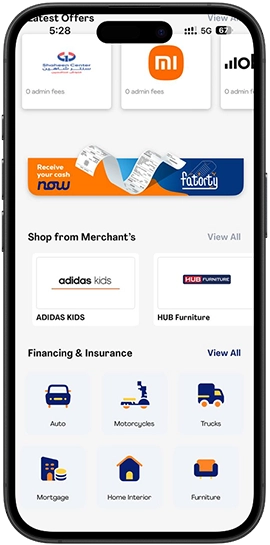
Choose the offer that suits you.
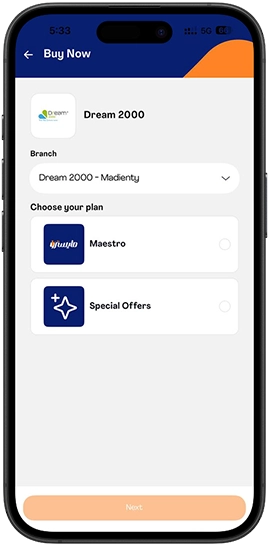
Enter the required information.
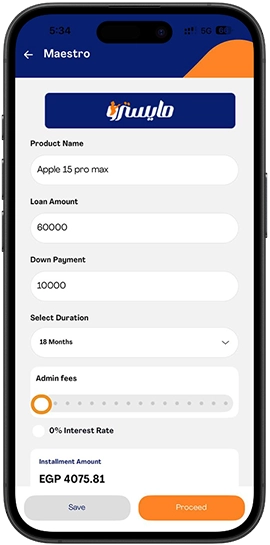
The merchant will review your data on their portal.
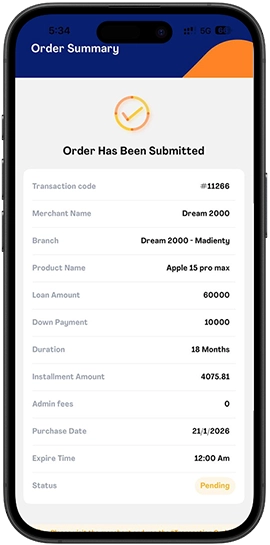
Visit the merchant’s branch and wait for their approval

You’ll then receive an OTP on your phone.
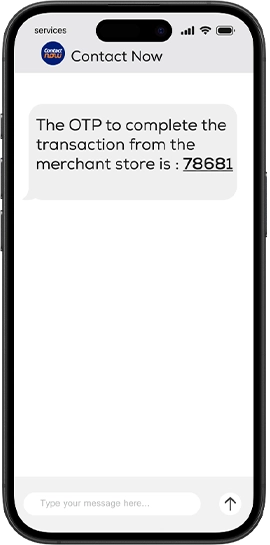
Once you confirm the OTP, your transaction is completed.
FAQS
How long does it take for an offer to be approved?
Once your data is reviewed and verified, you will receive an OTP to complete your transaction. Visiting the merchant branch and providing accurate information helps speed up the process.
Can I apply for more than one offer at the same time?
Yes, you can explore and apply for multiple offers that match your approved limit. Simply browse the Offers section, select the deals that suit you, and follow the application steps for each one directly through the ContactNow App.
How to Become a Contact Client and Get An Offer Today?
- Download the ContactNow App.
- Create your account and complete your registration.
- You’ll receive a limit decision, either approved or declined.
- If approved, visit the nearest Contact branch within 30 days to sign your contract.
- After signing, you’re officially a Contact client and can start applying for offers.
Your Feedback